How to use prepaid awards and prepaid credits in CPS Air
Prepaid awards are calculated with purchases on the iPads running CPS Air in version 3.100. You enable it in the Customer Class of Options.
To enable the prepaid credits for CPS Air
-
Go to Tools | Options | Reference Tables | Customer Class | Sales Category.
-
Select the Prepaid Credit Back checkbox.
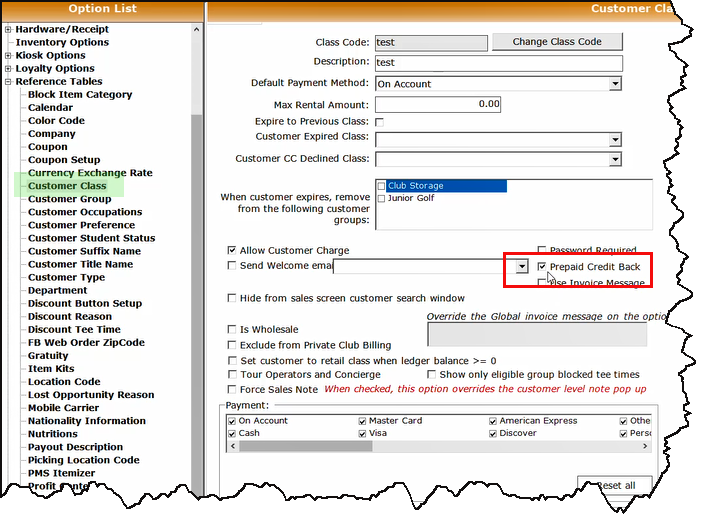
-
Select Save.
-
Go to Sales Category in Options | Reference Table | Sales Category.
-
Create or edit a sales category.
-
In the Prepaid Back field, set the % back on the sale category level by entering the percentage.
-
Click Save.
-
Go to Options | Sales Options | Payment Methods to elect which payment methods should be eligible to earn prepaid credit.
-
For each payment method you want this prepaid back percentage applied, open it and select the checkbox. Repeat for each payment method.
-
Click Save when finished. After you exit the software and open it up again, the prepaid credit will work when using a local terminal running CPS [POS Express] or an iPad running CPS Air.
Shout out to Jennifer Webster O’Connor, Owner & PGA Professional